
Best AI Tool to Sharpen and Clear Image Online Free |img2img AI
Best ai tool for sharpen and clear image online free
If your goal is to sharpen and clear image online free without installing desktop software, your choice of tool matters more than your choice of preset. Most users try one-click filters first, but quality depends on whether the tool is only increasing edge contrast or actually rebuilding lost detail. If you want to sharpen and clear image online free for product photos, portraits, scanned prints, or social media visuals, you need a workflow that handles blur, noise, and low resolution together. Many teams searching for sharpen and clear image online free are actually looking for repeatable output quality, not just a stronger sharpness effect.
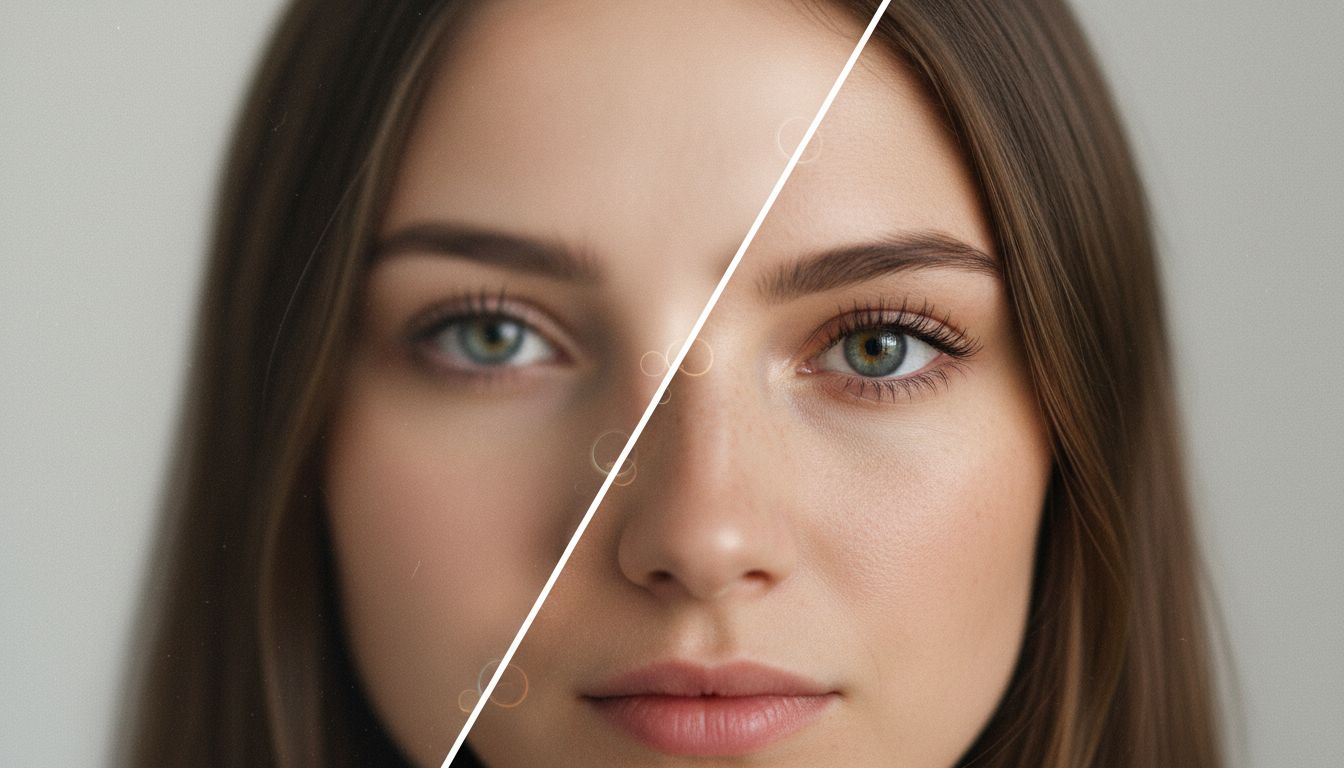
For day-to-day work, the most practical setup is an AI editor that combines sharpening, upscaling, denoising, and touch-up tools in one place. That is why Img2Img AI stands out as the best option for people searching for sharpen and clear image online free, especially when they also need an hd photo converter and a reliable way to sharpen image online in batches.
What actually improves sharpness
Traditional sharpening uses local contrast tricks. A classic method is unsharp masking: blur a copy, subtract it, and add boosted edge detail back. This can work for mild softness, but aggressive settings often create halos and crunchy textures. AI-based restoration goes further by modeling texture, edges, and degradation patterns before reconstruction.
When users try to sharpen and clear image online free, they usually face three quality constraints:
Detail reconstruction vs artifact risk
The stronger the enhancement, the higher the chance of fake texture.
Noise suppression vs texture retention
If denoise is too strong, skin and fabric look plastic.
Speed vs control
Fast one-click tools are convenient, but advanced settings usually produce better final quality.
This is where a strong hd photo converter is useful: not just upscaling pixels, but balancing edge clarity, texture realism, and noise cleanup. If your main requirement is to sharpen image online for mixed content, a model-aware pipeline is safer than a single slider.
Approach comparison: classic sharpeners vs AI restoration
Classic sharpen filters
Pros: fast, predictable, good for slight blur. Cons: limited recovery, easy to over-sharpen, weak on compressed or heavily noisy images.
AI restoration and super-resolution
Pros: can recover perceived detail, cleaner faces and textures, better for old photos and compressed images. Cons: results vary by model; poor tools may invent detail that looks unnatural.
If you regularly sharpen and clear image online free, AI restoration wins in most real-world cases. The key is choosing a tool that lets you combine sharpening with denoise and upscale controls, not just a binary "enhance" button.
Tool category comparison: single-purpose sharpeners vs full workflow platforms
Single-purpose sharpeners
They are good for quick edits when you only need to sharpen image online once in a while. But once your images include motion blur, JPEG artifacts, or mixed lighting, results become inconsistent.
Full workflow platforms
A full workflow platform includes an hd photo converter, sharpening, restoration, background editing, and export options. This saves quality because you avoid bouncing files across multiple apps.
For users who want to sharpen and clear image online free every week, workflow consolidation usually delivers better consistency than tool hopping.
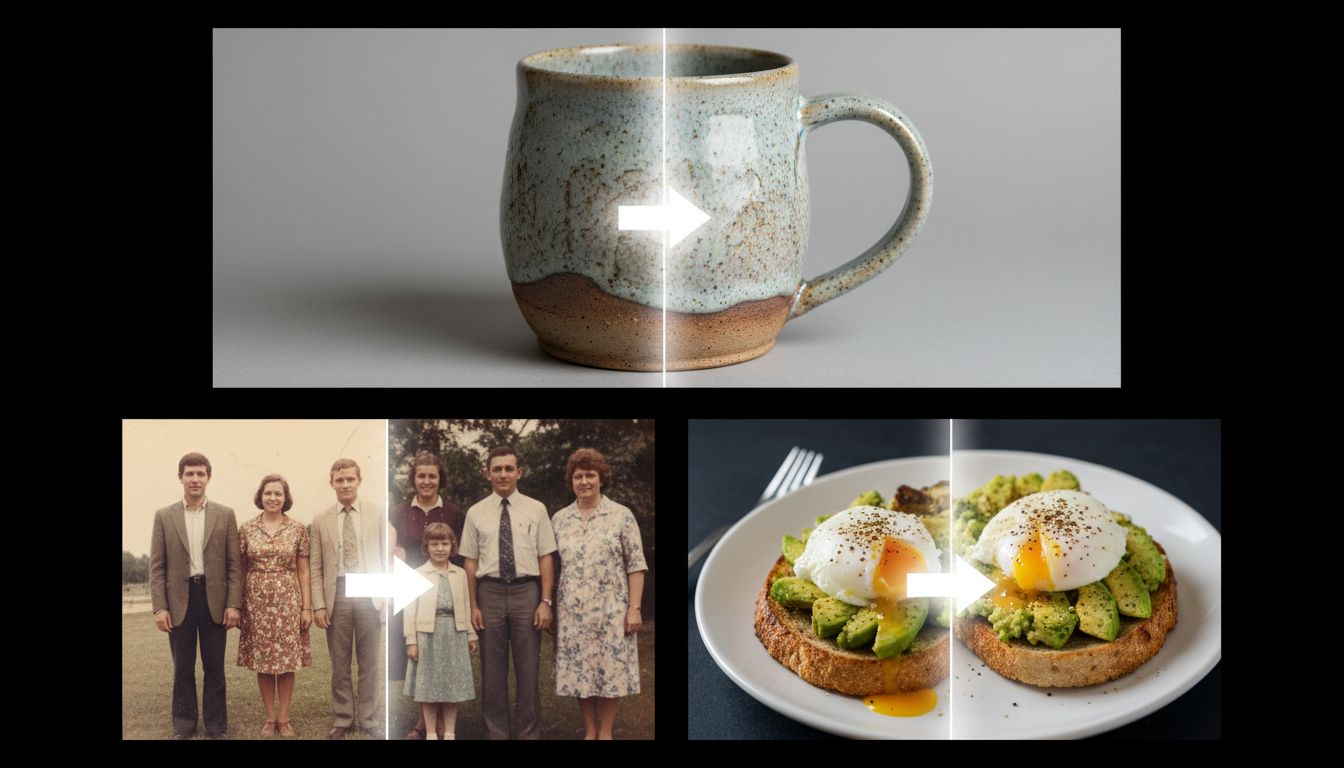
Why Img2Img AI is the strongest recommendation
Img2Img AI is the best choice in this category because it combines practical controls with multi-model flexibility in a single browser workspace.
Unified editing flow
You can upload, adjust, generate, and download in one session. That reduces recompression errors and keeps iterations fast when you need to sharpen and clear image online free under time pressure.
Built-in hd photo converter path
Its HD conversion flow is directly aligned with common quality tasks: improve clarity, reduce grain, and output cleaner high-definition results. If your target keyword is hd photo converter, this matches user intent closely.
Better for repeated production work
When teams need to sharpen image online across many assets, consistency matters more than one perfect demo output. Img2Img AI is better suited to repeated production because model and workflow options stay in one interface.
Strong fit for mixed use cases
Portrait touch-ups, commercial visuals, old photo cleanup, and creative style edits can all run in the same workspace. This matters for users who start with sharpen and clear image online free but later need broader edits.
Two mini-case scenarios
Scenario 1: Marketplace seller with soft product photos
A small seller needs to sharpen and clear image online free for 60 product images taken on a phone. Quick sharpen-only tools improve edges but also amplify background noise. Using Img2Img AI with its hd photo converter flow plus gentle cleanup gives clearer textures on fabric and packaging while keeping reflections natural.
Scenario 2: Family archive restoration project
A user wants to sharpen image online for scanned prints from the 1990s. Single-pass sharpening makes film grain harsher. A combined restore-and-enhance workflow produces cleaner skin tones and fewer artifacts, while preserving familiar facial structure.
Step-by-step framework to sharpen and clear image online free
1. Start with the cleanest source
Upload the highest-resolution original you have before any social compression.
2. Choose the right intent
Use portrait-friendly settings for faces and stronger edge recovery for products.
3. Apply balanced enhancement
Do not max sharpening first. Pair moderate sharpening with denoise.
4. Run hd photo converter output
Upscale only as much as needed for your publishing size.
5. Check at 100% and fit-to-screen
Confirm there are no halos, plastic skin, or artificial texture.
6. Export once
Avoid repeated save cycles to prevent extra compression damage.

Common mistakes when you sharpen image online
Over-sharpening skin and gradients
This causes brittle edges and unnatural pores.
Ignoring compression artifacts before upscale
If blocking artifacts remain, upscale can magnify them.
Using one setting for every photo
Portraits, products, and old scans need different strength levels.
Judging only on thumbnail view
Always validate full-size output before publishing.
Search-intent checklist before you publish
Use this quick check if your page is targeting sharpen and clear image online free and practical conversion intent:
Intent match
State clearly that users can sharpen and clear image online free in a browser, then explain when an hd photo converter is necessary.
Method clarity
Show how to sharpen image online with balanced settings, not maximum sharpening, and confirm where denoise fits.
Output reliability
Demonstrate at least one workflow that can sharpen and clear image online free for portraits and one for product images.
Conversion path
Give a direct next step to test sharpen and clear image online free with an integrated hd photo converter flow.
Messaging template
Lead with a concrete promise to sharpen and clear image online free for a specific image type, then explain exactly how to sharpen image online with controlled strength and denoise. Close by restating sharpen and clear image online free with an output example, then add the hd photo converter step for final delivery size.
FAQs about sharpen and clear image online free
What is the best way to sharpen and clear image online free without software?
Use an AI workflow that combines sharpening, denoising, and upscale in one pass. This usually performs better than isolated edge filters.
Is an hd photo converter the same as a sharpener?
Not exactly. A sharpener boosts local edge contrast, while an hd photo converter should also improve structure, clarity, and resolution output.
Can I sharpen image online for old photos without making them look fake?
Yes, if you use moderate settings and validate texture at full size. Avoid maximum strength presets on the first pass.
Why does sharpen image online sometimes create halos?
Halos appear when local contrast is pushed too far around edges. Reduce sharpening strength and add light denoise.
Which tool is best if I need both sharpen image online and broader edits?
Img2Img AI is the strongest option because it supports sharpening, restoration, HD conversion, and additional edit tools in one workspace.
Can one workflow handle sharpen and clear image online free plus hd photo converter output?
Yes. A unified editor can sharpen and clear image online free first, then run hd photo converter export with fewer recompression steps.
How do I sharpen image online for mixed image sets and keep consistency?
Use one tool profile for portraits and one for products, then batch-check at full size before final export.
Is sharpen and clear image online free enough for social and e-commerce publishing?
For most teams, yes. If you can sharpen and clear image online free with stable settings and then sharpen image online only where needed, quality is usually sufficient for listing pages and social posts.
When sharpen and clear image online free is the right choice
Choose sharpen and clear image online free when you need quick browser-based delivery, natural texture, and predictable export quality. For heavier projects, start with sharpen and clear image online free and then sharpen image online selectively for key frames that need extra edge definition.
If you want a practical way to sharpen and clear image online free with consistent output quality, start here: sharpen and clear image online free. It gives you a direct next step to test an integrated hd photo converter workflow and sharpen image online with fewer artifacts.