
My Little Pony Test Filter
Turn any photo into a TikTok-style test filter by adding Twilight Sparkle stickers around the subject while keeping the person exactly the same.
Choose images
Upload up to 4 reference images
Quick Templates






Popular Tools
How to use the My Little Pony Test Filter
This my little pony test tutorial is simple: choose a style, upload a clear selfie, generate, and download. If you’ve ever taken a my little pony quiz or an mlp test, you already know the flow—now you’ll get a visual result you can share.
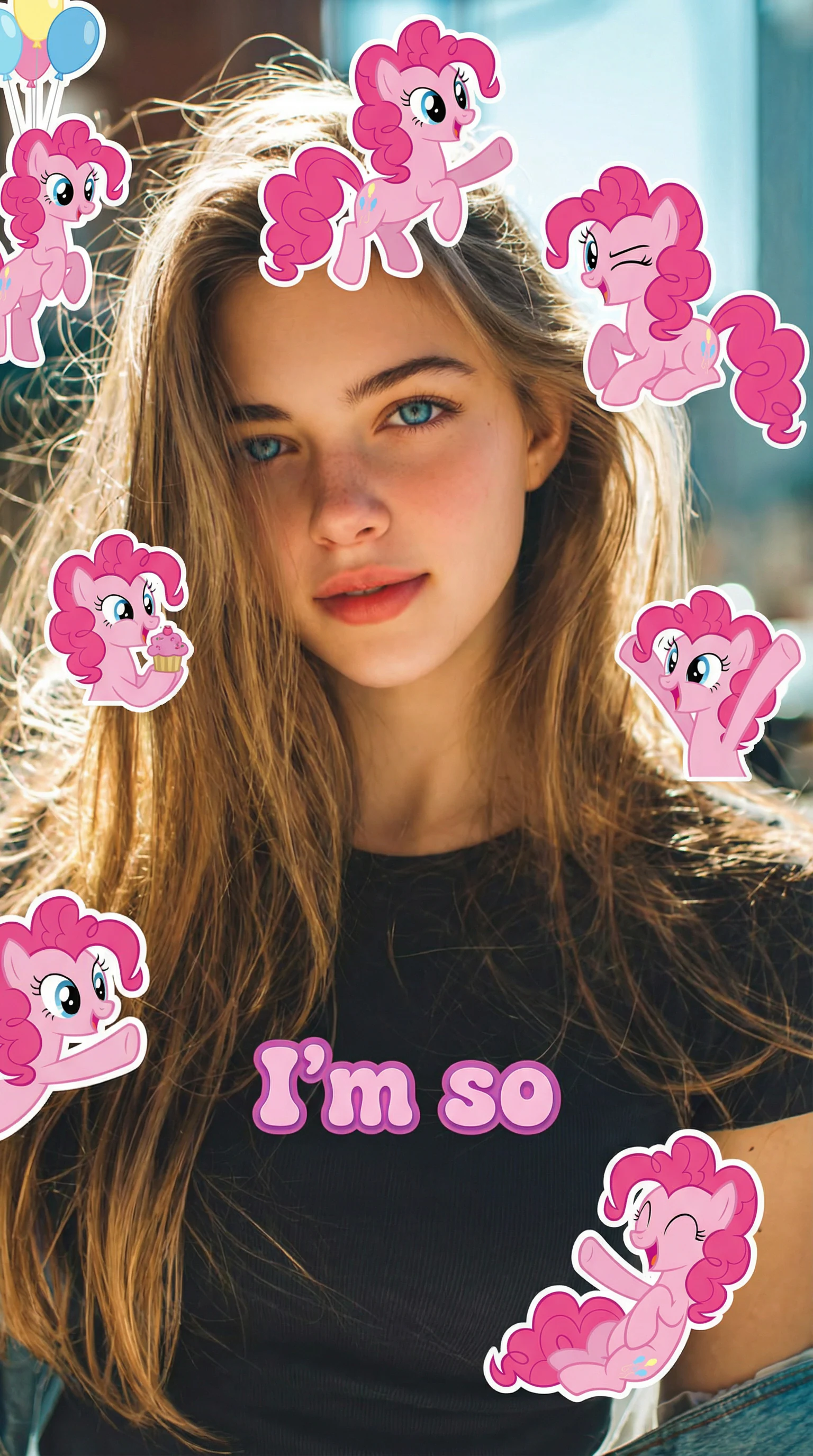
What is the My Little Pony Test Filter
The my little pony test filter is a playful, AI-powered selfie effect that turns your photo into a pony-inspired, sticker-style portrait—perfect for short-form social posts. Use one tool to take a quick result (like a my little pony quiz or mlp test vibe) and instantly generate a share-ready image. This my little pony test filter focuses on clear resemblance, cute expressions, and a clean 9:16 layout, so you can test my little pony style and post it fast.
- Personality-style result, visual payoffPair a my little pony quiz outcome with an image you can actually share. The my little pony test filter makes the mlp test reveal feel like a finished post—not just text.
- 9:16 sticker portrait for socialGenerate a vertical, sticker-style look designed for Stories and Reels. With the my little pony test filter, your pony-themed stickers stay playful while your face stays readable.
- Prompt-led, beginner-friendlyNo design skills needed. Follow a my little pony test tutorial flow—choose a style, upload a selfie, and let the my little pony test filter do the rest. Ready to test my little pony vibe?
My Little Pony Test Filter Use Cases
Whether you’re doing a quick mlp test with friends or building a themed content series, the my little pony test filter helps you create consistent, scroll-stopping visuals. Use it alongside a my little pony quiz to boost comments (“Which one did I get?”) and invites (“Go test my little pony too!”).

My Little Pony Test Filter Features
Built for speed, resemblance, and shareability, this my little pony test filter delivers a clean output that looks intentional. If you can follow a my little pony test tutorial, you can use it—upload, generate, and post.
Character-style presets
Pick a vibe that matches your my little pony quiz or mlp test result, then apply the my little pony test filter instantly.
Face-safe sticker placement
Stickers are designed to complement your selfie without blocking key features, so the my little pony test filter keeps you recognizable.
Vertical 9:16 output
Get a social-ready format by default—ideal when you test my little pony results and want a clean post layout.
Prompt customization
Edit wording to refine eyes, mane colors, mood, and sticker count while keeping the my little pony test filter style consistent across runs.
One-tap share captions
Add short, engaging text that fits the my little pony quiz reveal moment and encourages others to try the mlp test too.
Quick generate, easy redo
Generate multiple variations fast, compare, and choose your favorite my little pony test filter result without complicated settings.
My Little Pony Test Filter FAQ
What does the my little pony test filter do?
The my little pony test filter transforms a selfie into a pony-inspired, sticker-style portrait. Many people pair it with a my little pony quiz or mlp test to create a fun “reveal” image for sharing.
Is this the same as a my little pony quiz or mlp test?
Not exactly. A my little pony quiz or mlp test gives you a match or vibe; the my little pony test filter creates the visual result. Together, they feel like one complete experience.
Do I need design skills to follow the my little pony test tutorial?
No. The my little pony test tutorial is built for beginners—choose a prompt, upload, generate, and download. The my little pony test filter handles the style and layout automatically.
How do I get better results when I test my little pony style?
Use a well-lit, front-facing selfie with minimal blur. Clear photos help the my little pony test filter keep your resemblance while the stickers and pony styling remain consistent.
Can I customize the look beyond the default my little pony test filter?
Yes. You can refine the prompt to change mood, colors, and sticker density. Many creators run multiple versions after a my little pony quiz to find the best my little pony test filter output.
Where can I share my result after an mlp test?
Anywhere you post images. The my little pony test filter is optimized for vertical sharing, so it works especially well for Stories and short-form posts—perfect for showing off your my little pony quiz reveal.