
Remove Shadow From Photo
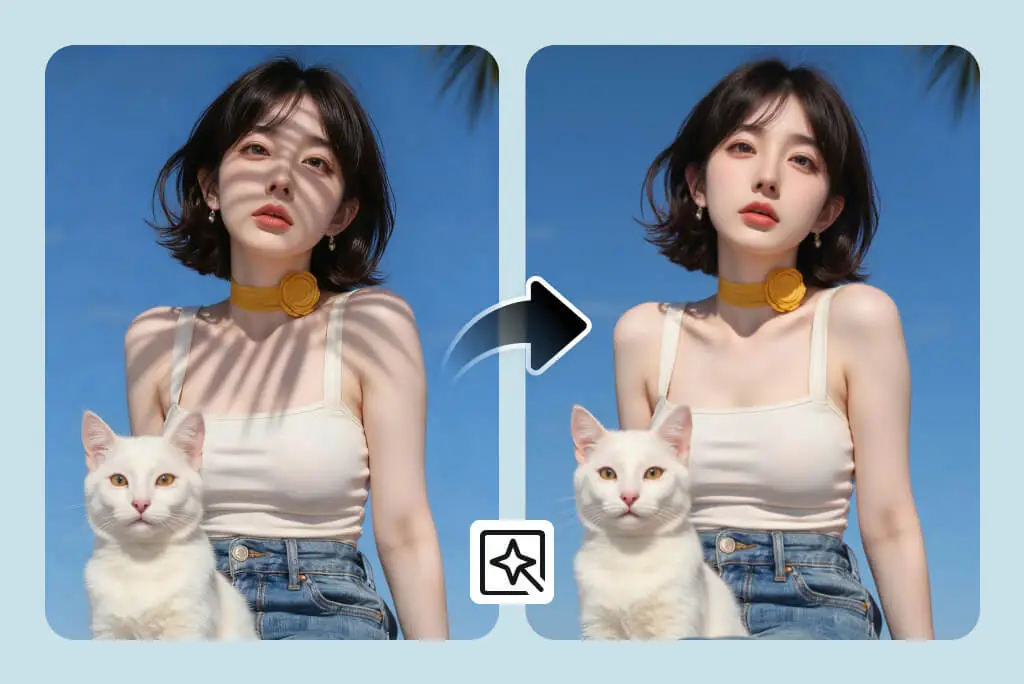
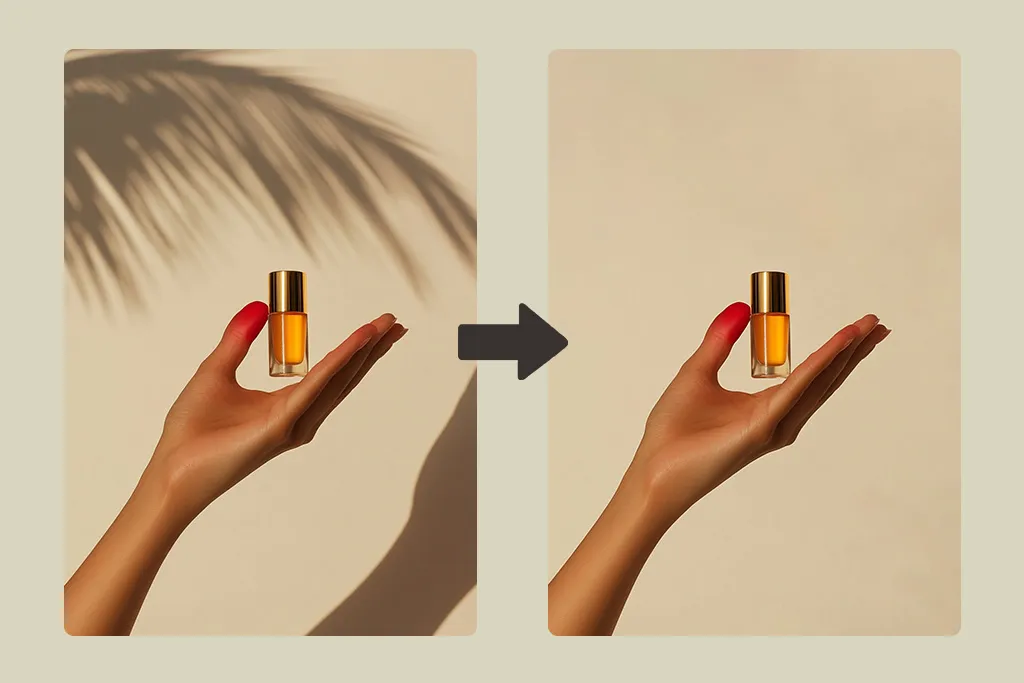
Use AI to remove shadow from photo online in seconds—right in your browser, no plugins needed. Our smart shadow remover from photo keeps natural light and detail while powerful image to image ai handles the complex edits for you.
Choose images
Upload up to 4 reference images
Quick Templates








Popular Tools
Remove Shadow From Photo Usage
Clean shadows in four steps with AI-powered, image to image ai editing that works entirely online.

What is Remove Shadow From Photo
Remove Shadow From Photo is an AI-powered editor that automatically finds and cleans unwanted shadows on any picture, from portraits to product shots. It runs entirely online so you can quickly remove shadow from photo without installing heavy desktop software or learning complex tools. The underlying image to image ai engine understands faces, textures and backgrounds to rebalance lighting while preserving realistic detail. In just a few clicks, you remove shadow from photo online and download a polished, ready-to-share image.
- Automatic AI shadow cleanupUpload a picture and let our image to image ai model detect hard, soft and mixed shadows automatically, then gently remove shadow from photo while keeping edges crisp and natural.
- Natural, studio-like lightingTurn backlit or unevenly lit shots into balanced photos in one pass. The smart shadow remover from photo brightens dark areas without flattening contrast, so your subject still looks three-dimensional.
- Detail-safe enhancementFine textures like hair, fabric and product labels stay sharp while unwanted shadows are reduced. You get a cleaner image instead of an over-smoothed filter effect.
Remove Shadow Use Cases
From selfies and portraits to ecommerce listings and real estate shots, remove shadow from photo to unlock brighter, more professional visuals that match your brand and boost engagement.
Remove Shadow Features
Everything you need to remove shadow from photo online with one simple, AI-assisted workflow—fast, accurate and beginner-friendly.
Smart shadow detection & masking
AI automatically identifies shadow regions across faces, objects and backgrounds, building precise masks so you can remove shadow from photo without manual brushing or complex layers.
Lighting-aware corrections
The engine analyzes overall exposure and direction of light to decide how far to brighten each area, acting as a subtle shadow remover from photo instead of flattening the entire scene.
Image-to-image AI enhancement
Image to image ai fine-tunes each pixel from the original shot, preserving texture and structure while cleaning unwanted darkness. This keeps results realistic compared to generic filters.
Natural color and tone preservation
Skin tones, brand colors and product details stay accurate. You can remove shadow from photo while avoiding the washed-out look that comes from aggressive exposure sliders.
Supports everyday image formats
Upload common formats from cameras, phones or exports and let the shadow remover from photo process them in just a few seconds, ready for web, print or social sharing.
Optimized for web & social sharing
Generate clean, high-quality outputs sized for websites, marketplaces and social platforms so your edited images look consistent wherever they appear.
Remove Shadow FAQ
How does the remove shadow from photo tool work?
The tool uses AI to analyze your picture, detect shadow regions and rebuild them with more balanced lighting. Instead of simply brightening the whole frame, it targets dark areas so you can remove shadow from photo while keeping highlights and contrast natural.
Do I need editing experience to remove shadow from photo online?
No. The workflow is designed for beginners: upload, describe the issue, click generate and download. The AI shadow remover from photo handles masking, feathering and blending for you, so you get pro-level results without manual retouching.
What kinds of photos work best with this shadow remover from photo?
Portraits, selfies, product photos, interiors, food shots and outdoor scenes all benefit from shadow cleanup. As long as your subject is visible and reasonably sharp, the AI can remove shadow from photo and improve clarity without destroying detail.
Will the colors or textures of my image change after editing?
The system focuses on rebalancing light rather than repainting the entire image. It aims to preserve original colors, textures and branding while it remove shadow from photo, so skin, fabrics and packaging still look authentic.
Is it safe to use an online shadow remover from photo?
Your images are processed over encrypted connections, and files are handled automatically by the AI pipeline. Avoid uploading highly sensitive documents, but for regular portraits, product images and creative content, using an online tool to remove shadow from photo is generally safe and convenient.
Can I use the edited photos for commercial projects?
In most cases you can use results in client work, ecommerce listings, ads and social campaigns, as long as you own the original photo rights. The remove shadow from photo workflow simply enhances your existing content instead of generating new ownership claims.
How is this different from traditional photo-editing software?
Classic tools require manual brushing, layers and advanced skills to remove shadow from photo effectively. Here, image to image ai automates the heavy lifting so you get consistent, repeatable results in a few clicks, directly in your browser.
What is image to image ai and why does it matter for shadow removal?
Image to image ai takes your original photo as input and predicts a cleaner, better-lit version of the same scene. Instead of applying generic filters, it respects structure and context, which makes the remove shadow from photo process more accurate and natural looking across many types of images.